
By Samuel Torres — Software & Cloud Engineer. 23+ production sites.
On November 21, 2026 I took the Google Core Hackathon End of Year on HackerRank: 4 algorithm problems and 150 minutes to solve them. The entry window ran from 10:00 to 10:30; I got in around 10:21 and finished around 12:50. Official results take at least a week, so I'm not going to tell you where I placed, because I don't know.
What I can tell you is how the clock feels. And here's what I took away: staying calm doesn't mean feeling no pressure; it means having a method for when you do. The pressure shows up either way. What changes is whether, in that moment, you know what to do with your hands or you just stare at the screen.
This post is part of a series about that challenge. If your exam day hasn't come yet, start with how to prepare for a programming hackathon.
The red screen moment
Halfway through, I ran my code and the screen filled up with red errors. My first thought was: "this is exactly what I was afraid of."
That thought is the dangerous part. Not because it's wrong (it is scary), but because it pushes you to do something fast: delete everything, switch ideas, jump to another problem, type random changes and hope one sticks. None of that fixes the error. It just burns minutes.
What I did over the next 30 seconds was a short routine, the same one I'm leaving you below:
- I took a breath.
- I reread the problem statement.
- I wrote the idea down in one sentence on paper.
That's it. If the idea fits in one sentence, the logic is probably fine and what's failing is the code itself. If it doesn't fit, the problem is something else, and you need to think it through before you keep typing.
Thirty seconds feels like a lot when the clock is running. It isn't. What's expensive is spending ten minutes changing things without knowing what you're looking for.
The 30-second reset
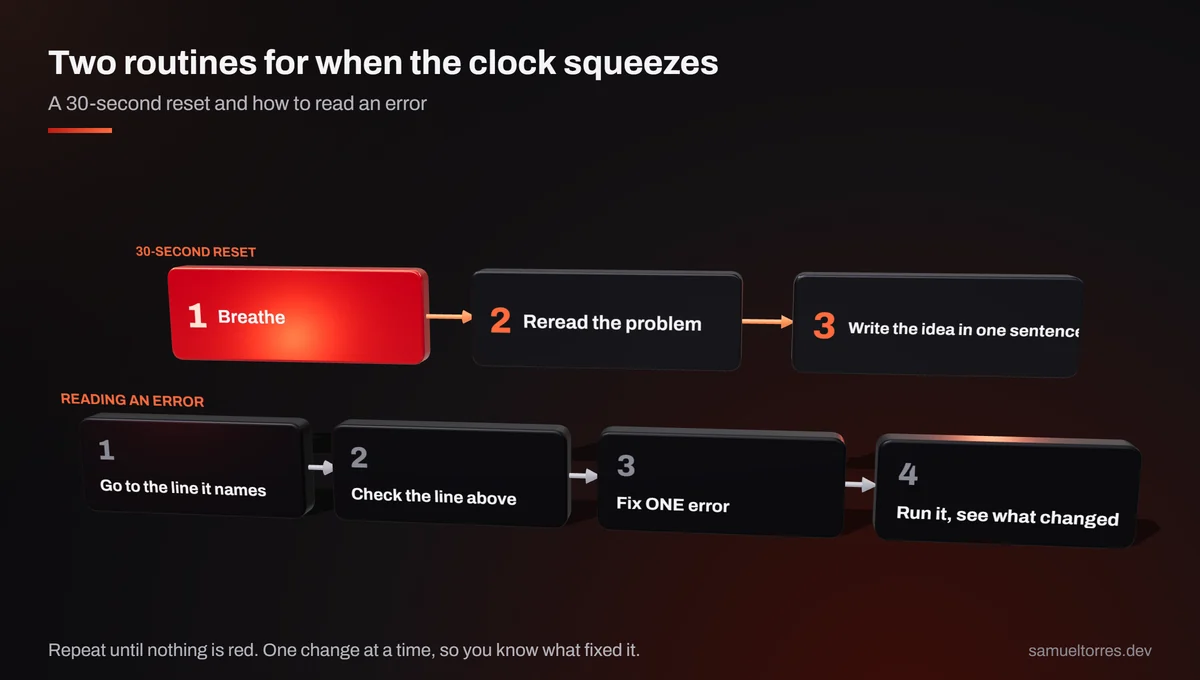
Here it is on its own, so you can copy it:
Breathe. Reread the problem. Write the idea in one sentence on paper.
Why each step works:
- Breathing is the pause that pulls you out of "type faster" mode. It's the handbrake. That's all it needs to be.
- Rereading the problem brings you back to the goal. Under pressure it's easy to end up solving a different problem from the one you were given.
- The sentence on paper separates the idea from the code. "Sort and compare neighbors" is an idea.
for ($i = 1; $i < $n; $i++)is how you write it. Once you split them, you know which of the two is broken.
Have it ready before you start. Literally: a sheet of paper next to the keyboard with those three lines.
1. Read the error, don't suffer it
An error message isn't a scolding. It's a clue with an address. It almost always tells you the line where the interpreter noticed something was off.
My routine for reading an error:
- Find the line number in the message. Start there.
- Check the line above it too. A lot of the time the real mistake is earlier: a missing semicolon or an unclosed brace only gets noticed on the next line.
- Fix ONE error.
- Run the code again and see what changed. If the message changed, you made progress, even if it's still red.
A screen full of red doesn't always mean twenty errors. One misplaced character can knock over everything after it.
2. One error at a time
When you see a pile of errors, the temptation is to fix five things in one go. The trouble is that if something is still wrong after those five changes (or something new breaks), you no longer know which of the five did it.
One at a time is slower per change and much faster overall. Every run teaches you something specific: "that one's done", "that one's the same", "that one changed". Five changes at once only teach you "something happened".
3. Separate logic from syntax
There are two kinds of failure and you fix them differently:
- Syntax: the code isn't written correctly. The interpreter complains before it runs.
- Logic: the code runs, but gives a different answer, or takes too long.
With the clock on top of you, they blur together. You start rethinking the algorithm when all that's missing is a $. Or the other way around: you fix commas while the underlying idea is wrong.
This is where the sentence on paper helps again. If the idea is clear and written down and the code won't run, it's almost certainly syntax. And syntax, in my experience, often breaks because of a single character.
One-character mistakes
This is the table I put together with mistakes of that kind. None of them is hard to fix; what's hard is spotting them in a hurry:
| Mistake | What I wrote | What it should be |
|---|---|---|
Missing $ | numbers[$i] | $numbers[$i] |
Letter o instead of zero | $pa[o] | $pa[0] |
| Comma instead of semicolon | $k < $n, $k++ | $k < $n; $k++ |
| Assigning instead of comparing | if ($diff = $min) | if ($diff == $min) |
| Flipped operator | +- | += |
| One brace too many or too few | extra or missing } | braces in pairs |
| Misspelled word | retunr, usor | return, usort |
Assigning instead of comparing is one of the sneakiest, because the code runs:
<?php
$min = 2;
$diff = 5;

if ($diff = $min) {   // assigns 2 to $diff: the condition is always true
    echo "pair found\n";
}

if ($diff == $min) {  // compares: this is what you meant
    echo "pair found\n";
}
No red message. Just the wrong output.
And the letter o one actually happened to me on the Ancestral Names problem. On one attempt, only 1 out of 10 test cases passed. The reason: I'd typed $pa[o] instead of $pa[0]. The one case that passed had identical names and never reached that line, so the bug didn't show up there. When 1 case passes and 9 fail, the useful question isn't "what's wrong with my algorithm?" but "what's different about the case that passes?" That question takes you straight to the line.
[MISSING SCREENSHOT: HackerRank result showing 1 of 10 test cases passing on Ancestral Names, before fixing $pa[o]]
A note on language: I started the challenge in C and switched to PHP, the one I use every day for WordPress and plugins. Under pressure, writing in the language you think in leaves your head free for the problem instead of for remembering how to write something. I talk more about choosing a language in how to prepare.
4. Breathe before you change strategy
Switching strategy is sometimes the right call. What doesn't pay off is switching in the heat of the moment, right after the red shows up.
Before you delete a solution, go through the 30-second reset. If after rereading the problem and writing the idea down you still think the approach is wrong, then switch. If the idea holds up, what you've got is a typo, and deleting everything sends you back to zero over something a single character would have fixed.
It also helps to read what the platform is actually telling you. On HackerRank, the clock icon on a test case means it ran out of execution time (a timeout), not that the answer is wrong. Those are two different problems: one needs a faster idea, the other needs a look at the logic. Mixing them up sends you to fix what isn't broken.
5. Accept that not everything will work out
This isn't giving up; it's managing your time. Here's where my four problems ended up, based on what I saw when I finished:
- Closest Numbers: solved.
- Ancestral Names: all test cases.
- Minimum Health: 11 out of 15 test cases; the other 4 timed out.
- Maximum Earnings: I submitted it in the last few minutes and didn't get to confirm the result.
On Minimum Health I had a slow but correct version. I could have stayed there fighting for the 4 missing cases, but the clock kept running and there was another problem waiting. Locking in what already worked and moving on was the decision; I go into it in more detail in do the easy one first, then level up.
Accepting that not everything will work out takes a weight off: you stop playing not to lose and start scoring points where you actually can.
What I wouldn't do
- I wouldn't delete a whole solution because of a red screen. The 30-second reset first; then I decide.
- I wouldn't fix five things at the same time. One at a time, run it, see what changed.
- I wouldn't read only the line the error points to. The one above it too.
- I wouldn't mistake a timeout for a wrong answer. The clock icon asks for speed, not different logic.
- I wouldn't get stuck on the last test cases of one problem while there's a whole other problem I haven't touched.
Want to talk?
This way of working isn't just for hackathons. Reading the error, changing one thing and seeing what happened works the same when something breaks on a live site, and I run 23+ of them. If you have a web project or a system that needs someone who works like that, reach out through contact. And if you're curious how other challenges have gone, they're under hackathons.
Sources
- Challenge context (4 problems, 150 minutes, 10:00–10:30 entry window, joined ~10:21 and finished ~12:50), the red screen moment, the reset routine and my self-reported results: Samuel's own experience at the Google Core Hackathon End of Year (HackerRank, Nov 21, 2026).
- One-character mistakes table and the
$pa[o]bug on Ancestral Names (1 of 10 test cases): Samuel's own experience at the Google Core Hackathon End of Year (HackerRank, Nov 21, 2026). - Clock icon meaning a timeout on a test case: Samuel's own experience at the Google Core Hackathon End of Year (HackerRank, Nov 21, 2026).
usort— php.net
About the author
Samuel Torres is a Software & Cloud Engineer at Conqr Digital Agency (Mexico City). He runs 23+ production WordPress sites and processed 80,000 documents with OCR + LLM. More at /en/about. Get a quote on WhatsApp in 2 min